GitHub Actions vs. BuildKite for AI Startup CI
Start with GitHub Actions, then add Buildkite once GPUs force it.
GitHub Actions vs. Buildkite for AI startup CI is a decision about hardware before it is a decision about features or price. GitHub Actions is the right default for most young teams. Buildkite becomes worth the extra work when GPU validation, evaluation dependencies, and build volume outgrow that default. Teams usually add a layer while keeping the existing stack.
Why GPU access breaks the standard CI assumption for AI teams
An engineer pushes a model evaluation job and watches it error out on a machine with no GPU. The workflow exists, but the hardware it needs does not. The standard hosted GitHub Actions runner is a virtual machine without a discrete GPU for CUDA or GPU-based OpenCL workloads. A team can write perfectly good YAML and still have no way to test GPU kernel correctness on that runner.
That breaks the usual assumption behind hosted CI. For ordinary application code, a general-purpose machine can run the tests and tell the team whether a change passes. GPU-dependent validation needs more than a machine that can start the job. It needs hardware capable of exercising the code being changed. Once that validation must happen on every pull request, access to suitable compute becomes the first constraint, ahead of workflow convenience or the size of a free allowance.
What GitHub Actions actually is, and where most AI startups begin with it
GitHub Actions runs automated workflows from the repository where a team already keeps its code. A file in .github/workflows/ is enough to begin. There is no separate account, OAuth flow, or webhook to set up. That makes the distance between pushing code and getting useful CI unusually short. For a startup trying to ship its first product, this is a substantial advantage.
The marketplace has over 20,000 community actions, while reusable workflows let teams share pipeline logic across repositories. OIDC federation with AWS, GCP, and Azure provides a standard pattern for cloud deployments. The JetBrains DevEcosystem 2025 Survey puts a majority of the total CI/CD market on GitHub Actions. Its reach is not just a consequence of being nearby.
For one to three engineers without a dedicated infrastructure role, GitHub Actions is the correct default. It runs application tests, linting, container builds, and deployments without the team having to manage machines. At that stage, it costs nothing meaningful for the usual workload. More importantly, it leaves the founding team working on the product.
The two specific ways GitHub Actions breaks for AI pipelines
The first limit is access to affordable, available GPU compute. GitHub offers NVIDIA T4 hosted runners, so saying that Actions has no GPU option would be wrong. But larger runners are unavailable on the Free plan. They are available on Team plans, with billing from the first minute and no included-minute coverage. Their expense and limited availability make them a different proposition from the standard runner most startups begin with.
VirtusLab’s OpenCL-based LLM inference engine shows how a runtime mismatch can block validation. After the team switched to native FP16 weight storage, its CI could no longer validate generated kernels because PoCL, its CPU-based OpenCL runtime, lacked the cl_khr_fp16 extension. The team solved that particular problem with Intel oneAPI’s CPU runtime. That example is not proof that every such failure requires a GPU. A CPU-based setup can pass its tests and still lack what the model code needs to run.
A team can register a GitHub Actions runner on its own GPU instance. As of March 2026, however, self-hosted runners on private repositories incur a $0.002 per minute “Actions cloud platform” fee.
The second limit is the pipeline’s static structure. Actions has conditional steps, path-based triggers, and dynamic job matrices, but they all run within a workflow the team defines ahead of time. Model evaluation may depend on a change to a dataset, prompt template, model weight, or shared library that a simple file pattern does not capture. Actions does not natively maintain that dependency graph, so the team must maintain the mapping itself. With more than a handful of model variants or evaluation configurations, that becomes recurring engineering work.
The 256-job matrix limit restricts how far a single matrix can expand, while the 60-concurrent-job Team plan limit constrains standard parallel workloads. GPU larger runners have separate concurrency allowances, so that standard limit should not be treated as universal.
What Buildkite is and why its architecture fits the GPU problem
Buildkite separates the service that coordinates work from the machines that perform it. Its control plane runs the scheduling, the interface, and the pipeline logic. In the self-hosted model, the team supplies cloud instances, Kubernetes clusters, on-prem servers, or GPU nodes. Buildkite also sells hosted agents for teams that want less to manage. The main reason to choose it here, though, is control over compute.
Agents can be tagged with capabilities such as gpu=true, arch=arm64, or custom labels. Pipeline steps then go to the agent class with the tags they need. A model training job can land on a GPU node while linting runs on a cheap spot instance.
The pipeline itself can also change during execution. Buildkite’s dynamic pipelines generate and upload steps at runtime, allowing affected evaluations to become the jobs that actually run. The team still needs to express which changes affect which evaluations. But it can use that logic to generate the workflow rather than squeeze every possible branch into a predefined structure. Buildkite’s documentation also describes support for 100,000+ concurrent agents, giving large evaluation runs room to fan out when the team has the compute.
Agents connect outbound to pull work and run it in the team’s own environment. Buildkite’s security overview says source code and secrets stay there, while metadata and logs go to the control plane. For proprietary model weights, fine-tuning datasets, and pre-commercial research, keeping them there helps meet the diligence requirements that investors and enterprise customers set. Operating this design still has costs.
The real cost trade-off — per-minute vs. per-seat, and when each model wins
GitHub Actions and self-hosted Buildkite put growth on different parts of the bill. Actions’ per-minute charges grow with tests, matrix jobs, retries, and larger runners. Buildkite’s per-seat charge stays the same as teams run more build minutes on their own hardware. Compute still has to be paid for. It appears on the team’s cloud bill, where committed-use discounts, spot instances, and autoscaling can apply.
A GitHub-hosted GPU job incurs the hosted runner’s per-minute rate. The self-hosted Buildkite equivalent incurs the cloud GPU rate plus its share of the seat cost. When a team uses a self-hosted GPU with Actions, it pays the $0.002 per minute private-repository platform fee on top of its compute costs. These are distinct billing paths, even when the underlying job is the same.
On one side are the costs of hosted minutes, or of running the team’s own compute plus Actions’ platform fee. On the other sit Buildkite seats, own-compute costs, and the engineering time needed to run the fleet. A numerical break-even point depends on the team’s runner choices, seats, workload, and ability to operate infrastructure.
After GitHub’s January 2026 hosted-runner price cut, teams have to run more builds before they reach the crossover. Low volume generally favors avoiding a fixed operating burden, while sustained heavy usage gives fixed seat pricing more room to pay off. GPU access can force the hardware decision before the billing comparison favors a move.
The operational overhead Buildkite adds and what it costs a small team
Buildkite does not make infrastructure work disappear. A self-hosted fleet needs instance selection and sizing, autoscaling, runner health monitoring, Docker layer cache management, and agent patching. Those jobs land on the team’s backlog. A lower usage bill can still be a poor bargain if keeping runners healthy takes time away from the product. For a small founding team, that is the strongest objection to adopting it.
The advice for one to three engineers is blunt. If GPU evaluations are not blocking pull requests yet, do not set up Buildkite. During a startup’s first six months, GitHub Actions can handle the application layer while occasional GPU evaluations run through cloud notebooks or ad-hoc scripts. That leaves some validation manual, but avoids building an agent fleet before the workflow needs one.
Teams start to make the move when manual evaluation can no longer keep up with the development loop. GPU validation on every PR, daily build queues, and flaky evaluation gates often make that pressure clear when a team has ten-to-thirty engineers. Headcount alone is not the trigger. An infrastructure-capable founding engineer may make the operational burden manageable earlier, while a team without that skill has a higher adoption cost. The team needs to assess whether the pipeline now consumes more engineering time than operating a better one would.
How agentic development workflows change the CI calculus in 2026
Agentic development weakens the link between team size and build volume. When AI agents commit and push code autonomously, CI can receive bursts faster than a human team would normally produce them. Dataset updates can also trigger batches of GPU evaluations without a corresponding burst of code changes. A small team can therefore face a scheduling problem that its headcount does not predict.
For startups building on or near agentic coding tools, this is already an operating condition. The pipeline must decide which evaluations are affected and find suitable hardware for them under burst load. Buildkite’s runtime-generated steps and scalable agent concurrency fit that pattern. They let the team schedule more work as it provisions machines and grows its fleet, beyond what the standard hosted concurrency allowance permits.
Actions’ lower prices help absorb more build minutes. They do not provide missing GPU access or remove workflow and concurrency constraints. Conditional steps and dynamic matrices still help, but those limits hold even when work spikes. The practical change in 2026 is narrow but important. CI planning now has to account for both how work arrives and how many engineers are allowed to push it.
When to stay on GitHub Actions, when to add Buildkite, and how most AI teams actually run both
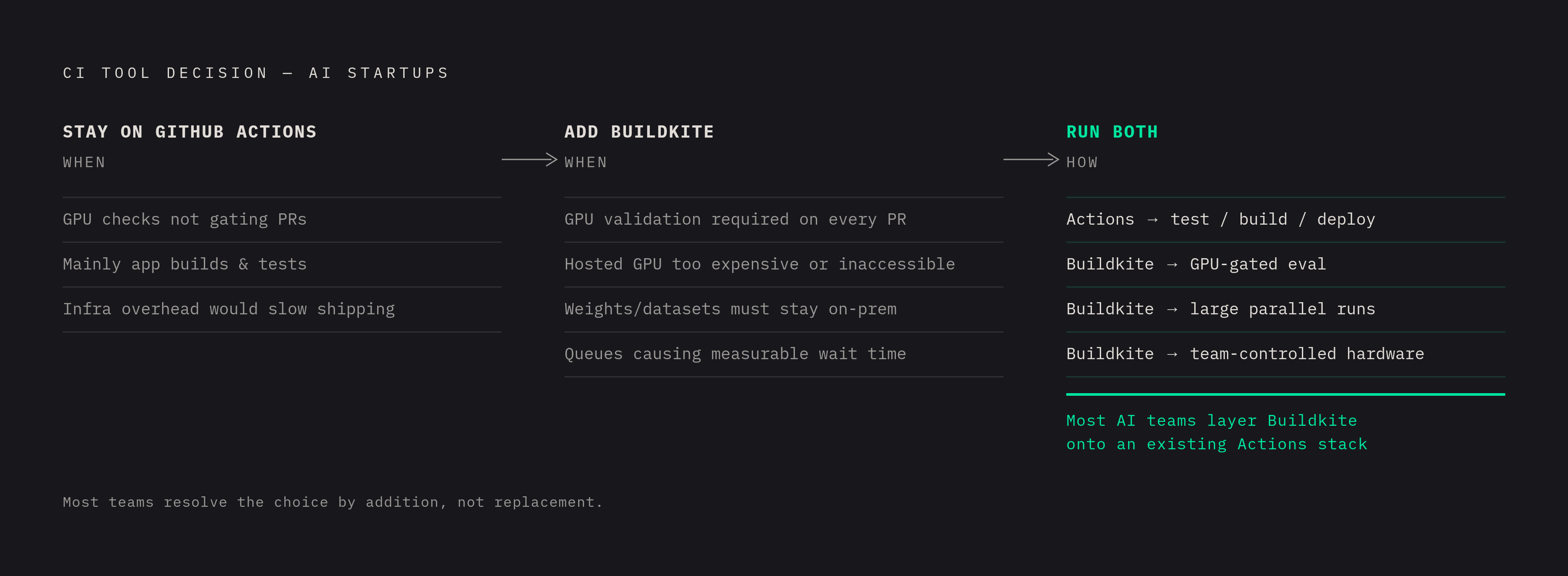
The decision follows the maturity of the evaluation pipeline. Stay on GitHub Actions when GPU checks are not gating PRs, the work is mainly application builds and tests, and infrastructure management would distract from shipping. Public-repository work that fits standard runners is an especially strong case because of unlimited free minutes. There is no reason to move that work simply because the product uses AI.
Add Buildkite when GPU validation must happen on every PR and GitHub-hosted GPU capacity is inaccessible, too expensive, or insufficiently available. The need to keep proprietary weights and datasets inside infrastructure the team controls can also prompt a move. So can measurable developer wait time from peak-hour queues or persistent manual upkeep of evaluation dependencies.
Most AI teams resolve the choice by running both. GitHub Actions keeps the standard test, build, and deploy loop, while Buildkite takes GPU-gated evaluation, large parallel runs, and steps that need team-controlled hardware. The application pipeline need not be replaced.
For an engineer assessing a new role, that division also provides a useful signal. A company without GPU evaluations in CI still tests that part of model reliability manually. That can be reasonable early on, but it becomes harder to justify as those evaluations gate releases and developer work. Model reliability either becomes a repeatable gate or still depends on someone remembering to check.